
Download Aadhaar Card – e Aadhaar, UIDAI Portal, mAadhaar
⏰ FREE Aadhaar Document Update — Deadline: June 14, 2026. Update your Proof of Identity & Address at myaadhaar.uidai.gov.in before the deadline — it’s completely free! Especially critical if your Aadhaar is 10+ years old and never updated. After the deadline, the same update costs Rs. 75.
Download Aadhaar Card –
Step-by-Step Guide (All 5 Methods)
✅ 100% Free Download
🏛️ Officially Valid📱 Works on Mobile
🔐 Secure Process🇮🇳 UIDAI Verified
Quick Answer
How to Download Aadhaar Card Online?
- 🌐 Method 1: myAadhaar portal — myaadhaar.uidai.gov.in (fastest, free)
- 📱 Method 2: mAadhaar App (Android & iOS)
- 📂 Method 3: DigiLocker — digilocker.gov.in
- 🏛️ Method 4: UMANG App
- 📵 Method 5: Without registered mobile — Face Authentication or Aadhaar Centre
Picture this — you walk into a bank, the officer asks for your Aadhaar, and you realize your physical card is sitting at home. Don’t stress. Your e Aadhaar Download takes less than two minutes, and that digital copy carries the exact same legal weight as the original card. UIDAI — the Unique Identification Authority of India — made the process dead simple, completely free, and accessible on any device.
This guide covers every single method to Download Aadhaar Card. Whether you need it on your laptop, phone, or you lost your registered mobile number — there’s a way. Let’s get straight into it.
What is e-Aadhaar and Is It Legally Valid?
The e-Aadhaar Download gives you a digitally signed PDF of your Aadhaar card — the same one UIDAI sends by post, just in digital form. It contains your 12-digit Aadhaar number, name, date of birth, gender, address, photograph, and a QR code. The aadhaar validity of the digital copy is exactly the same as the physical one. Under the Aadhaar Act 2016 and IT Act 2000, your downloaded e-Aadhaar works as valid proof of identity and address everywhere in India — banks, airports, SIM cards, government offices, everywhere.
Official UIDAI Confirmation The UIDAI official website confirms: “Downloaded Aadhaar is as valid as the original Aadhaar letter.” You can also do a complete Aadhaar card verification at myaadhaar.uidai.gov.in to confirm your Aadhaar is active.
What You Need Before You Start
Before you hit the myaadhaar.uidai.gov.in download page, check that you have these basics ready:
Forgot your Aadhaar number? Go to myaadhaar.uidai.gov.in → click “Retrieve Lost or Forgotten EID/UID” → enter your name and registered mobile → get your number via OTP. You can also do an aadhaar card status check here to confirm your Aadhaar has been generated.
UIDAI Aadhaar Download via myAadhaar Portal
This is the official, most reliable way. The UIDAI Aadhaar Download portal at myaadhaar.uidai.gov.in works on any browser — desktop or mobile — no app needed.
My Aadhaar Download — Official UIDAI Portal
myaadhaar.uidai.gov.in | Free | Works on any device
- Open your browser and go to myaadhaar.uidai.gov.in (theeaadhaar.uidai.gov.indownload page redirects here)
- Click “Download Aadhaar” under the “Get Aadhaar” section
- Select your ID type: Aadhaar Number,Enrolment ID, or Virtual ID
- Enter your number and fill in the security captcha
- Optional: Tick“Do you want a Masked Aadhaar?” for added privacy
- Click “Send OTP”— OTP arrives on your registered mobile
- Enter the OTP and click “Verify & Download”
- Save the Aadhaar PDF Downloadfile to your device
If your name has an initial (e.g., P. KUMAR), remember this exact format when entering your PDF password later. The system is case-sensitive.
My Aadhaar Download via mAadhaar App
The mAadhaar app is UIDAI’s official mobile application. It does everything the portal does — plus extras like biometric lock, TOTP generation, and family profile management. You can carry up to 5 Aadhaar cards for your family members right inside the app.
mAadhaar App — Download on Android & iOS
Google Play Store | Apple App Store | 13 Indian languages
- DownloadmAadhaarfrom Play Store or App Store
- Open the app and choose your preferred language
- Tap“Register Aadhaar”→ enter your Aadhaar number → create a 4-digit PIN
- Enter the OTP sent to your registered mobile — your profile is set up
- From the home screen, tap“Download Aadhaar”under All Services
- Choose: Regular Aadhaar or Masked Aadhaar
- Enter your Aadhaar number and captcha → tap“Request OTP”
- Enter OTP → tap“Verify”→Aadhaar PDF Downloadcomplete
🔒 What Else Can You Do in mAadhaar?
- biometric lock aadhaar— lock your fingerprint & iris data when not in use
- Generate TOTP (offline OTP — no SMS needed) as a backup when network fails
- Check Aadhaar authentication history — see who verified your identity
- Order pvc aadhaar card for Rs. 50
- Generate or retrieve your Virtual ID (VID)
Download via DigiLocker
DigiLocker is the government’s digital document vault. Your Aadhaar on DigiLocker pulls directly from UIDAI’s server — so it’s always the latest version. You can also share your Aadhaar directly with banks and services without downloading anything.
- Go to digilocker.gov.in or download the DigiLocker app
- Sign in with your mobile number, Aadhaar number, or username
- New user? Create a free account with mobile + OTP
- Search “Aadhaar Card” under Browse Documents
- Select UIDAI → enter Aadhaar number → verify with OTP
- Your Aadhaar appears in “Issued Documents”— download or share directly
Unique Advantage: DigiLocker lets you share your Aadhaar directly with service providers without downloading a file. This is the most future-proof way to manage your digital identity in 2026.
Download via UMANG App
UMANG (Unified Mobile Application for New Age Governance) is a single government app that bundles 2,000+ central and state government services, including Aadhaar download. It’s especially useful if you already use UMANG for other services.
- Download the UMANG app from Play Store or App Store
- Register with your mobile number and create a password
- After login, tap“Services”→ search“Aadhaar”
- Select “Download Aadhaar” from the Aadhaar service list
- Enter your Aadhaar number or Virtual ID → enter captcha
- Enter the OTP → tap“Verify”→ your Aadhaar Card Download Online is done
How to Download Aadhaar Without a Registered Mobile Number
This is the most searched problem — and the least well-answered. If your registered mobile number is no longer active, you still have four solid options:
| Method | Cost | Time | Best For |
|---|---|---|---|
| Face Authentication (mAadhaar) | FREE | Instant | Smartphone users |
| Order aadhaar pvc card order (alternate mobile) | Rs. 50 | 5–15 days delivery | Want a physical card |
| Visit Aadhaar Seva Kendra near me | Rs. 30 | Same day printout | No smartphone |
| link mobile number with aadhaar first, then download | FREE till Jun 14, 2026 | 1–3 days after update | Best permanent fix |
Option A: Face Authentication on mAadhaar
- Download the latest version of the mAadhaar app
- On the download screen, select“Face Authentication”instead of OTP
- Allow camera access — the app scans your face
- Authentication complete → Aadhaar PDF generated instantly
Option B: Visit Your Nearest Aadhaar Enrolment Centre
Walk into any Aadhaar enrolment centre or aadhaar seva kendra near you. Carry your Aadhaar number — biometric verification replaces OTP. You get a colour printout for Rs. 30. To find the nearest centre: visit uidai.gov.in → “Locate Enrolment Centre” → enter your PIN code.
Aadhaar PDF Password – How to Open Your Downloaded File
Every Aadhaar PDF Download is password-protected by UIDAI. The aadhaar pdf password format is simple — but getting it wrong is a common frustration. Here’s exactly how it works:
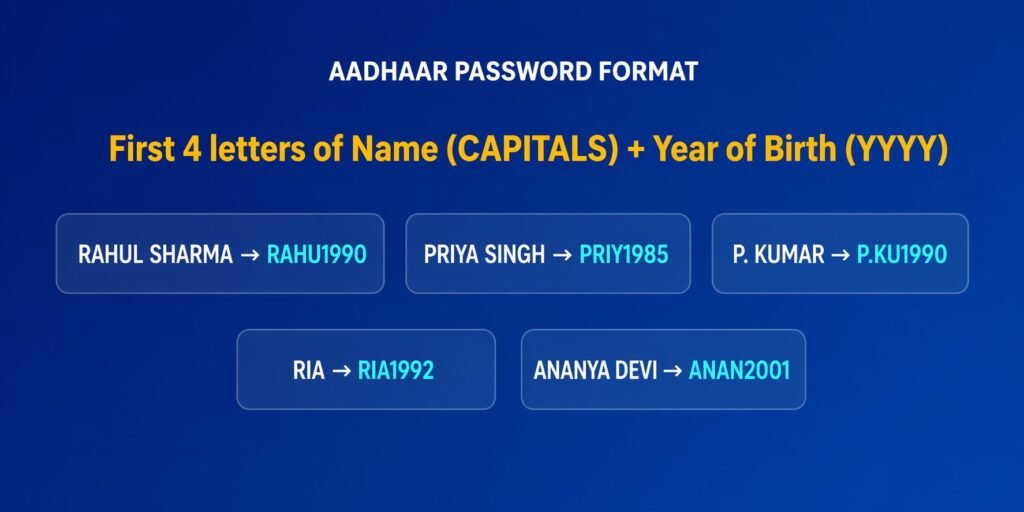
Can’t open the PDF? Check two things: (1) Is your name entered in CAPITAL letters exactly as it appears on your Aadhaar? (2) Is the PDF fully downloaded? A slow internet connection often creates a corrupted file — just re-download it.
Use Adobe Reader (recommended by UIDAI) to open the file. Microsoft Edge and Google Drive PDF viewer also work. Once open, you can print it on A4 paper — the printed copy is fully valid as identity proof.
Masked Aadhaar vs Regular Aadhaar
When you Download Aadhaar Card, you get a choice — Regular or Masked. Here’s the difference that matters:
| Feature | Regular Aadhaar | Masked Aadhaar |
|---|---|---|
| Aadhaar number visible | All 12 digits | Last 4 digits only (XXXX-XXXX-XXXX) |
| Legal validity | ✓ Valid | ✓ Valid |
| Government DBT schemes | ✓ Accepted | ✗ Not accepted |
| KYC at banks & telecoms | ✓ Accepted | ✓ Accepted |
| Hotel & travel check-in | ✓ Accepted | ✓ Accepted |
| Risk of identity theft | Moderate | Very Low |
| aadhaar kyc processes | ✓ Accepted | ✓ Accepted |
| PAN Aadhaar link | ✓ Required | ✗ Use Regular |
Rule of thumb: Use Masked Aadhaar for private companies, app KYC, hotels, and any service where sharing your full number feels unnecessary. Use Regular Aadhaar for government services, pan aadhaar link, and DBT schemes.
PVC Aadhaar Card – Durable, Wallet-Sized, Rs. 50
The pvc aadhaar card is the toughest, most professional version of your Aadhaar — a proper wallet card with hologram, ghost image, and a secure QR code. If you’re tired of paper printouts falling apart, this is worth the Rs. 50.
- Go to uidai.gov.in→ click “Order Aadhaar PVC Card”
- Enter your Aadhaar number → fill the captcha
- Select mobile for OTP — you can use analternate numberif your registered one is inactive
- Enter OTP → click “Make Payment”→ pay Rs. 50 online
- Save your Service Request Number (SRN)— use it foraadhaar tracking
- Card delivered via Speed Post in 5–15 working days
Track your delivery: uidai.gov.in → “Check PVC Card Status” → enter your SRN. UIDAI hands the card to India Post within 5 working days of your order. You can also do aadhaar pvc card download of the receipt as a PDF immediately after payment.
Aadhaar Update, Status Check, and Mobile Linking
How to Do Aadhaar card download update online
- Go to myaadhaar.uidai.gov.in→ click“Document Update”
- Log in with your Aadhaar number + OTP
- Select the field you want to update (address, name, DOB, gender)
- Upload clear scans of your Proof of Identity and Proof of Address (under 2MB each)
- Double-check all details → submit and save your URN (Update Request Number)
How to Check Aadhaar update status and Aadhaar enrolment status
Go to myaadhaar.uidai.gov.in → “Check Enrolment & Update Status” → enter your URN or EID → enter captcha → authenticate with OTP. The portal shows whether your request is Under Processing, Completed, or Rejected. You can also call 1947 and enter your EID to hear the status via IVR — useful if you don’t have internet access.
How to do aadhaar mobile linking
Linking or updating your mobile number with Aadhaar happens offline only — no online option exists for this. Visit your nearest aadhaar center or Aadhaar Seva Kendra with your Aadhaar number. The operator uses your biometric (fingerprint/iris) to verify you, updates the mobile number on the spot, and you get an acknowledgement slip. No documents required — just your fingerprint. After the update, your new number is active in 2-5 working days.
Critical Reminder: Biometric updates (fingerprints, iris, photo) and mobile number updates require a physical visit to an Aadhaar enrolment centre — they cannot be done online at any time. Submit your May 31 to allow time for resubmission if rejected before the June 14 free deadline.
How to Retrieve Aadhaar Number If Lost
Go to myaadhaar.uidai.gov.in → “Retrieve Lost or Forgotten EID/UID” → enter your full name and registered mobile or email → complete captcha → enter OTP. Your Aadhaar number or Enrolment ID gets sent to your mobile. This is also how you download Aadhaar by name and date of birth — first retrieve your UID, then download normally.
Protect Your Aadhaar – Security Tips
Most guides stop at the download. But what happens after matters just as much. Here’s how to keep your Aadhaar — and your identity — safe:
Lock Your Biometrics Turn on biometric lock aadhaar in the mAadhaar app. This prevents anyone from using your fingerprint for authentication when you’re not doing any transactions.
Use Masked Aadhaar Share masked Aadhaar for private-sector KYC and hotel check-ins. Your full 12-digit number stays protected from misuse.
Use Virtual ID Generate a 16-digit VID instead of sharing your Aadhaar number. Service providers cannot trace your Aadhaar from VID — maximum privacy.
Never Post on Social Media UIDAI explicitly warns against putting your Aadhaar on public platforms — WhatsApp groups, Facebook, Twitter — even as a photo.
Check Authentication History Open mAadhaar → Authentication History → see the last 50 times your Aadhaar was verified. Spot anything unfamiliar? Lock biometrics and call 1947.
Never Share Your OTP UIDAI never calls asking for your OTP. Not ever. If someone calls claiming to be UIDAI and asks for an OTP — hang up and report it at 1947.
UIDAI Official Helpline — 24×7, Free, All Languages
Use for: OTP not received, Aadhaar not found, biometric issues, fraud complaints, aadhaar card status check, and any other Aadhaar problem.
Email: help@uidai.gov.in | Online Grievance: uidai.gov.in → Grievance and Feedback
📞 1947
Frequently Asked Questions
Is e-Aadhaar as valid as the original Aadhaar card?
Yes. The aadhaar validity of an e-Aadhaar is identical to the physical card. Under the Aadhaar Act 2016, UIDAI’s digitally signed PDF carries full legal weight as identity and address proof across all of India.
What is the aadhaar password format to open the PDF?
The aadhaar password format is: first 4 letters of your name in CAPITAL letters + 4-digit birth year. Example: RAHUL born in 1990 → RAHU1990. If your name is 3 letters (e.g., RIA) → RIA1992.
How do I check my aadhaar card status check after applying?
Visit myaadhaar.uidai.gov.in → click “Check Enrolment & Update Status” → enter your 28-digit Enrolment ID (from your acknowledgement slip) → authenticate with OTP → view current status. Alternatively, call 1947 and follow the IVR.
How do I do pan aadhaar link and is it mandatory?
Yes, pan aadhaar link is mandatory for all Indian taxpayers. Failure means your PAN becomes inoperative. Link at incometax.gov.in → “Link Aadhaar” → enter PAN and Aadhaar → pay Rs. 1,000 penalty if already past the deadline → verify with OTP.
Can I do aadhaar kyc without visiting a bank branch?
Yes. aadhaar kyc happens digitally through UIDAI’s e-KYC system. Banks, telecoms, and NBFCs can verify your identity using your Aadhaar number + OTP — no branch visit needed. You can also share an offline eKYC XML from myaadhaar.uidai.gov.in for maximum privacy.
How to find Aadhaar Seva Kendra near me?
Go to uidai.gov.in → “Locate Enrolment Centre” → enter your PIN code, city, or state → a map with all nearby Aadhaar Seva Kendra near me results appears with addresses, timings, and contact numbers. You can book an appointment online before visiting.
How to do aadhaar biometric update?
aadhaar biometric update — including fingerprints, iris scan, and photo — can only happen at an authorized Aadhaar enrolment centre. You cannot update biometrics online. The fee is Rs. 100. Children must update biometrics at age 5 and again at age 15 (both are free).
Your Aadhaar, Always Ready
The days of scrambling for a physical card are over. Whether you use the UIDAI Aadhaar Download portal, the mAadhaar app, DigiLocker, or UMANG — your e-Aadhaar is free, instant, and fully legal. For most people, the myAadhaar portal is the fastest route. If you want something you can carry in your wallet, the PVC Aadhaar card at Rs. 50 is the best investment.
And don’t forget — free Aadhaar document update closes June 14, 2026. If your address or identity documents haven’t been updated in the last decade, head to myaadhaar.uidai.gov.in right now and do it for free. After June 14, it costs Rs. 75.
🔖 Bookmark this page — we update it with every UIDAI change.
Frequently Asked Questions
Is e-Aadhaar as valid as the original Aadhaar card?
Yes. The aadhaar validity of an e-Aadhaar is identical to the physical card. Under the Aadhaar Act 2016, UIDAI’s digitally signed PDF carries full legal weight as identity and address proof across all of India.
What is the aadhaar password format to open the PDF?
The aadhaar password format is: first 4 letters of your name in CAPITAL letters + 4-digit birth year. Example: RAHUL born in 1990 → RAHU1990. If your name is 3 letters (e.g., RIA) → RIA1992.
How do I check my aadhaar card status check after applying?
Visit myaadhaar.uidai.gov.in → click “Check Enrolment & Update Status” → enter your 28-digit Enrolment ID (from your acknowledgement slip) → authenticate with OTP → view current status. Alternatively, call 1947 and follow the IVR.
How do I do pan aadhaar link and is it mandatory?
Yes, pan aadhaar link is mandatory for all Indian taxpayers. Failure means your PAN becomes inoperative. Link at incometax.gov.in → “Link Aadhaar” → enter PAN and Aadhaar → pay Rs. 1,000 penalty if already past the deadline → verify with OTP.
Can I do aadhaar kyc without visiting a bank branch?
Yes. aadhaar kyc happens digitally through UIDAI’s e-KYC system. Banks, telecoms, and NBFCs can verify your identity using your Aadhaar number + OTP — no branch visit needed. You can also share an offline eKYC XML from myaadhaar.uidai.gov.in for maximum privacy.
How to find Aadhaar Seva Kendra near me?
Go to uidai.gov.in → “Locate Enrolment Centre” → enter your PIN code, city, or state → a map with all nearby Aadhaar Seva Kendra near me results appears with addresses, timings, and contact numbers. You can book an appointment online before visiting.
How to do aadhaar biometric update?
aadhaar biometric update — including fingerprints, iris scan, and photo — can only happen at an authorized Aadhaar enrolment centre. You cannot update biometrics online. The fee is Rs. 100. Children must update biometrics at age 5 and again at age 15 (both are free).
Your Aadhaar, Always Ready
The days of scrambling for a physical card are over. Whether you use the UIDAI Aadhaar Download portal, the mAadhaar app, DigiLocker, or UMANG — your e-Aadhaar is free, instant, and fully legal. For most people, the myAadhaar portal is the fastest route. If you want something you can carry in your wallet, the PVC Aadhaar card at Rs. 50 is the best investment.
And don’t forget — free Aadhaar document update closes June 14, 2026. If your address or identity documents haven’t been updated in the last decade, head to myaadhaar.uidai.gov.in right now and do it for free. After June 14, it costs Rs. 75.
🔖 Bookmark this page — we update it with every UIDAI change.