
Aadhaar address update
How to Update Address in Aadhaar Card Online 2026 — Complete Step-by-Step Guide
Moved to a new city? Changed your house? Your Aadhaar address must match your current location — or your bank KYC, DBT payments, and scholarship applications will fail. Here is every method, explained simply.
Five methods. Zero excuses. Whether you have documents or not, whether you live with family or alone, UIDAI has a way for you to update your address online from home.
⏰Free Update Deadline: June 14, 2026. After this date, UIDAI will charge ₹50 for online address updates. Update yours now — it takes under 10 minutes.
Why Updating Your Aadhaar Address Matters in 2026
Rajan moved from Patna to Bengaluru for work in 2019 but never updated his Aadhaar address. In 2026, his employer’s HR team asked all employees to complete bank KYC before March. His bank flagged an address mismatch between his Aadhaar (Patna) and his current bank account address (Bengaluru). His account got frozen. He lost access to his salary for three weeks — just because of one outdated detail on his Aadhaar.
— A real pattern experienced by millions of Indians every year
Rajan’s situation is not rare. Across India, millions of Aadhaar cards still carry old addresses from a decade ago — before marriages, job transfers, and city moves. People only discover the problem when it costs them something real.
Here is exactly what an outdated Aadhaar address can break for you:
✗Bank KYC rejection — As per RBI 2026 guidelines, banks verify your Aadhaar address during KYC. A mismatch can freeze your account or block transactions.
✗DBT payment failures — PM Kisan, LPG PAHAL subsidy, and MGNREGA wages transfer through Aadhaar-linked accounts. Wrong address causes payment failures.
✗Scholarship rejections — NSP and state scholarship portals verify your Aadhaar address for domicile eligibility. One mismatch and your application gets rejected at the final step.
✗Lost important mail — Your new debit card, PAN card, government notices, and policy documents go to your Aadhaar address. Wrong address means lost documents.
✗Ayushman Bharat health card issues — ABHA card verification fails when Aadhaar address does not match hospital or health records.
✅Good news: Unlike name changes (limited to 2 times) and date of birth corrections (allowed only once), Aadhaar address updates have no limit. You can update your address as many times as you need — there is no restriction.
Before You Start — Requirements Checklist
Do not start the process and get stuck halfway. Keep all of these ready before you open the UIDAI portal:
✓Your 12-digit Aadhaar number — printed on your Aadhaar card or find it at myaadhaar.uidai.gov.in
✓Mobile number registered with Aadhaar — you will receive an OTP on this number. No registered mobile? You must visit an Aadhaar Seva Kendra first.
✓Valid Proof of Address document — see the full documents list in Section 9 below. Make sure it is a clear colored scan, not a black-and-white photocopy.
✓Scanned file under 2MB — UIDAI rejects larger files. Use Adobe Scan app on your phone or compress at ilovepdf.com (free, no login).
✓Internet connection — stable connection on smartphone or laptop
✓Payment method — UPI, net banking, or debit card for ₹50 fee. Free if done before June 14, 2026.
⚠️Important:Your mobile number must be linked to Aadhaar for the OTP to come through. If your number changed or was never registered, visit your nearest Aadhaar Seva Kendra first. After mobile registration, you can do everything else online from home.
How to Update Aadhaar Address Online via myAadhaar Portal
This is the most popular method. It works on both smartphones and laptops. The entire process takes 5–8 minutes once you have your documents ready.
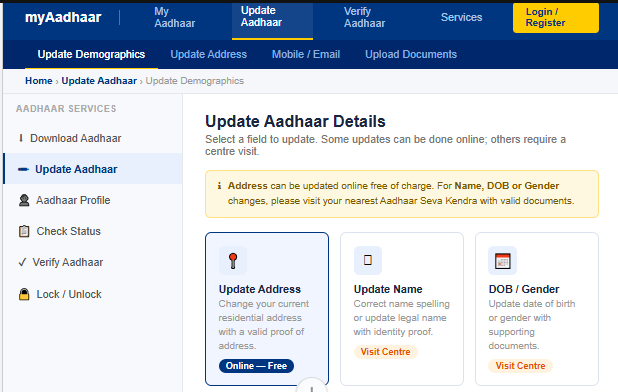
Visit → myaadhaar.uidai.gov.in → Click “Update Aadhaar” in the top menu → Select “Update Demographics Data & Check Status”
Source: myaadhaar.uidai.gov.in (Official UIDAI Portal)
- Open the official UIDAI portalVisit myaadhaar.uidai.gov.in on your browser. Do not use any third-party websites. Only the official UIDAI portal is safe for Aadhaar updates.
- Login with Aadhaar number + OTPEnter your 12-digit Aadhaar number. Complete the captcha. Click “Send OTP.” Enter the OTP received on your registered mobile number within 10 minutes.
- Click “Update Aadhaar Online”On the dashboard, select “Update Demographics Data & Check Status.” Then click “Update Aadhaar Online.” Read the instructions on screen before proceeding.
- Select “Address” and fill in the new detailsChoose “Address” from the update options. Fill in your complete new address — House/Flat No., Building Name, Street, Locality, City/Town, District, State, and PIN code. Every field must match your document exactly.
- Upload your Proof of Address documentSelect your document type from the dropdown (e.g., Electricity Bill). Upload the clear colored scan in JPG or PDF format. File size must stay under 2MB. All four edges of the document must be visible. Blurry photos are the #1 rejection reason.
- Preview, verify, and submitReview every detail carefully before clicking Submit. A small typo in the PIN code or street name causes rejection. Once satisfied, click “Submit Update Request.”
- Pay ₹50 and save your SRNPay the ₹50 update fee via UPI, net banking, or debit card. After successful payment, a Service Request Number (SRN) appears on screen and gets sent to your mobile via SMS. Save this number — you need it to track your update status.
💡Pro Tip — Document ScanningUse Adobe Scan (free app) on your smartphone. It auto-corrects perspective, adjusts lighting, and saves as a proper colored PDF. Print shops scan documents for ₹2–5 per page if you do not have a scanner. Black-and-white scans, phone screenshots, and poorly-lit photos get rejected every time.
How to Update Aadhaar Address via the New Aadhaar App 2026
UIDAI launched a completely new Aadhaar app in January 2026. This is different from the old mAadhaar app. The new app added face authentication, offline verification, and a cleaner update process. In its first two months, it surpassed 9 million downloads.
📱New App vs Old mAadhaarThe new Aadhaar app is separate from the old mAadhaar app. Search for “Aadhaar” on Google Play Store or Apple App Store and look for the app published byUIDAI (Unique Identification Authority of India). Both apps currently coexist — the new one has more features. The fee via the new app is ₹75 instead of ₹50 on the portal.
- Download the new Aadhaar appSearch “Aadhaar” on Google Play Store (Android) or Apple App Store (iOS). Download the official app published by UIDAI. Do not download any third-party app claiming to be “Aadhaar helper.” Login using Aadhaar number + MPIN or biometricEnter your 12-digit Aadhaar number. Authenticate using your MPIN, fingerprint, or face scan. The new app supports face authentication — a feature the old mAadhaar lacked. Go to Services → Address UpdateTap “Services” at the bottom of the home screen. Select “Address Update.” You will see two options — Document-Based Update or Head of Family (HOF) Based Update.
- Choose your update method and fill in addressSelect Document-Based if you have your own address proof. Enter your new address carefully. Check every field before proceeding — especially the PIN code and district name. Upload document, pay ₹75, and submitUpload your Proof of Address as a clear colored scan. Pay ₹75 through the in-app payment option. Save the SRN that appears after successful payment. Track your update status from within the app itself.
Aadhaar Address Update Without Address Proof — HOF Method
Many Indians do not have an address proof document in their own name. Homemakers do not have utility bills. Students live in hostels. Migrant workers share accommodation. Newly married women move to their husband’s house with no documents. UIDAI created the Head of Family (HOF) method specifically for these situations.
With the HOF method, you use a family member’s verified Aadhaar address as your own. You do not need any separate address proof document.
Who Can Use the HOF Method?
Homemakers
Spouse’s Aadhaar address used. Proof of relationship = marriage certificate.
Students
Parent’s Aadhaar used. Proof of relationship = birth certificate or school certificate.
Migrant Workers
Staying with relatives? Use that family member’s Aadhaar with ration card as relationship proof.
Elderly Parents
Adult child acts as HOF. Proof = any government document showing parent-child relationship.
HOF Method — Step-by-Step Process
- Open myAadhaar portal or new Aadhaar appLog in with your Aadhaar number and OTP. Go to “Update Aadhaar Online.” Select “Update Address via Head of Family” from the options. Enter your family member’s Aadhaar numberType your HOF’s 12-digit Aadhaar number carefully. The system checks if it is valid and if their mobile number is registered. If their mobile is not registered, the process stops here — they must link their mobile first by visiting an Aadhaar centre.
- Select your relationship typeChoose your relationship with the HOF from the dropdown — Spouse, Parent, Child, Sibling, etc. Select the correct option — a wrong selection causes rejection. Upload Proof of Relationship documentUpload a clear colored scan of a document that shows your relationship with the HOF. Accepted documents: Birth Certificate, Marriage Certificate, Ration Card (showing both names), MGNREGA Job Card, Passport. The document must clearly show both names and the relationship.
- Pay ₹50 feePay the non-refundable ₹50 fee. Even if the HOF does not approve the request later, this fee does not get refunded. Make sure your HOF is available and ready to approve before you pay.
- HOF receives SMS — must approve within 30 daysYour family member receives an SMS with a link to approve your request. They must log in to myAadhaar portal and approve under “My Head of Family Requests.” If they do not act within 30 days, your request closes automatically and no refund is given. Track status and download updated AadhaarOnce HOF approves, UIDAI processes the update. You get an SMS confirmation. Download your updated e-Aadhaar from myaadhaar.uidai.gov.in.
🚨Critical WarningThe ₹50 fee paid for the HOF method is completely non-refundable — even if the HOF fails to approve, even if the request gets rejected for any reason. Before you pay, confirm that your HOF’s mobile number is registered with their Aadhaar and that they are available to approve within 30 days.
Aadhaar Address Update via Address Validation Letter
What if you have no documents in your name AND no family member nearby? UIDAI has a solution for this too — the Address Validation Letter. This method lets you use a friend’s, colleague’s, or landlord’s address, with their consent. No property rights transfer. They simply confirm you live at that address.
This method suits people who recently moved to a new city, stay in a paying guest accommodation, or have no utility bills in their name yet. As of 2026, you can start this process on the new Aadhaar app, though UIDAI recommends completing the final step on the myAadhaar portal for a smoother experience.
- Request the Address Validation Letter on myAadhaarLog in to myaadhaar.uidai.gov.in. Select “Request for Address Validation Letter.” Enter the Aadhaar number of the person who will verify your address (called the “verifier”).
- UIDAI sends a Secret Code by post to the verifier’s addressUIDAI sends a physical letter with a unique secret code to the verifier’s registered address. This physical delivery confirms that the address is real. The verifier receives the letter within 7–15 days.
- Verifier gives you the secret codeThe verifier (your landlord, friend, or colleague) shares the secret code from the letter with you. They also consent online via a link sent to their registered mobile.
- Enter the secret code on myAadhaar to complete the updateLog back into myaadhaar.uidai.gov.in. Enter your SRN number and the secret code. Review the address details and confirm. Your Aadhaar address gets updated to the verifier’s address.
Note: The verifier only confirms that you live at their address. They do not give you any legal right over their property. If your landlord is uncomfortable, ask a trusted colleague or friend who lives nearby and whose Aadhaar shows a nearby address.
Aadhaar Address Update Offline at Aadhaar Seva Kendra
Some situations require an in-person visit. If your mobile number is not registered with Aadhaar, if you face biometric issues, or if your online requests keep getting rejected for complex reasons — the offline method at an Aadhaar Seva Kendra (ASK) resolves everything in one visit.
- Find your nearest Aadhaar Seva KendraVisit bhuvan.nrsc.gov.in/aadhaar to find the nearest authorized centre. You can also book an online appointment at the UIDAI website to avoid long queues.
- Carry original documents + self-attested photocopiesBring original documents for verification and self-attested photocopies to submit. Also carry your Aadhaar card. Without originals, the centre cannot verify your identity.
- Fill the Aadhaar Correction/Update FormAsk for the Aadhaar Update Form at the centre, or aadhaar card download it in advance from uidai.gov.in/en/my-aadhaar/downloads. Fill all fields in English, clearly and without errors.
- Submit documents and give biometric verificationHand over your filled form and document photocopies to the operator. Give fingerprint and/or iris scan for biometric authentication. Elderly citizens who face biometric issues should inform the operator — special assistance is available.
- Pay ₹75 and collect acknowledgement slipPay the ₹75 update fee at the centre counter. Collect your acknowledgement slip with the URN (Update Request Number). Keep this slip safe — it is your proof of submission and helps you track the update online.
📬 Method 6 (Bonus) — Update by PostYou can mail your filled Aadhaar Correction Form along with a self-attested photocopy of your address proof to:UIDAI, Post Box No. 10, Chhindwara, Madhya Pradesh – 480001orUIDAI, Post Box No. 99, Banjara Hills, Hyderabad – 500034.This method takes the longest — use it only if you cannot visit a centre.
All 5 Methods Side-by-Side — Which One Is Right For You?
No other guide puts all methods in one table. Here is the complete comparison so you can pick the right one in 30 seconds:
| Method | Fee | Mobile Needed? | Documents | Time | Best For |
|---|---|---|---|---|---|
| myAadhaar Portal | FREE till Jun 14 ₹50 after | Yes ✓ | Address Proof | 3–10 days | Most people — fastest online route |
| New Aadhaar App | ₹75 | Yes ✓ | Address Proof | 3–10 days | Smartphone users who prefer app |
| HOF Method | ₹50 | Yes (yours + HOF’s) | Relationship Proof | Up to 30 days | No address proof — using family address |
| Validation Letter | ₹50 | Yes ✓ | None | 15–30 days | No documents, no family nearby |
| Offline Seva Kendra | ₹75 | No ✓ | Original + Copy | 7–30 days | No registered mobile, biometric issues |
Quick Decision — Which Method Should You Use?
→Have address proof + registered mobile? → Use Method 1 (myAadhaar portal). It is the fastest and cheapest.
→No address proof but family member has Aadhaar? → Use Method 3 (HOF). No documents needed from your side.
→No documents, no family nearby? → Use Method 4 (Address Validation Letter). Ask a landlord or trusted friend.
→Mobile not registered with Aadhaar? → Go offline (Method 5). Visit Aadhaar Seva Kendra with original documents.
Complete List of Accepted Documents for Aadhaar Address Update
UIDAI accepts 15+ documents as Proof of Address. The name on your document must exactly match the name on your Aadhaar — even a single spelling difference causes rejection.
Category A — Most Commonly Used
- Passport
- Voter ID Card
- Driving Licence
- Bank Passbook / Statement (max 3 months old)
- Electricity Bill (max 3 months old)
- Water Bill (max 3 months old)
- Gas / LPG Bill (max 3 months old)
- Landline / Broadband Bill
Category B — Other Accepted Documents
- Ration Card
- Rent / Lease Agreement
- Property Tax Receipt
- Pension Payment Order
- Government-issued Domicile Certificate
- Credit Card Statement (max 3 months)
- Post Office Account Statement
For HOF Method — Proof of Relationship Documents
- Birth Certificate
- Marriage Certificate
- Ration Card (showing both names)
- MGNREGA Job Card
- Passport (showing family info)
UIDAI supports address updates in 11 regional languages — Hindi, Bengali, Gujarati, Kannada, Malayalam, Marathi, Odia, Punjabi, Tamil, Telugu, and Urdu. When you enter your new address in English on the portal, it auto-transliterates to your selected regional language on the Aadhaar card.
Aadhaar Address Update Fees, Free Deadline & Update Limits — 2026
- FREE: Online via myAadhaar Portal Until June 14, 2026 only. After deadline, ₹50 applies.
- ₹50: Online — After June 14, 2026 myAadhaar portal or HOF/Validation Letter method.
- ₹75: Via New Aadhaar App All address updates through the new Aadhaar app.
- ₹75: Offline at Seva Kendra In-person update at Aadhaar Seva Kendra.
- ₹125: Biometric Update Free for children aged 5–17 until September 30, 2026.
All Fees Non-Refundable: UIDAI does not refund update fees under any circumstance — not even if your request gets rejected, not even if the HOF fails to approve in time. Double-check everything before submitting and paying.
Update Limits — What Changed in 2026
- Address — No limit. Update as many times as you need throughout your life.
- Name — Maximum 2 times in your entire lifetime. Use wisely.
- Date of Birth — Only once. Make sure it is correct before submitting.
- Mobile Number — No online option. Visit Aadhaar Seva Kendra — no limit on updates.
How to Check Your Aadhaar Address Update Status
After submitting your update request, do not just wait and wonder. Track your status any time using your SRN or URN number.
- Visit the UIDAI status check pageGo to myaadhaar.uidai.gov.in → Scroll to “Check Aadhaar Update Status” in the services section.
- Enter your SRN or URN numberEnter the Service Request Number (SRN) from your SMS, or the Update Request Number (URN) from your acknowledgement slip. Complete the captcha and click Submit.
- Read your current statusThe portal shows one of four statuses — “Request Received,” “Under Process,” “Approved,” or “Rejected.” Each status tells you exactly where your request stands.
- 📥Request Received — UIDAI received your request. Processing will begin soon.
- ⏳Under Process — Your documents are being verified. Normal processing takes 3–10 working days online, up to 30 days offline.
- ✅Approved — Update complete. Download your updated e-Aadhaar immediately from myaadhaar.uidai.gov.in.
- ❌Rejected — Your request was rejected. Check the reason, fix the issue, and resubmit. See Section 12 below for the most common rejection reasons and exact fixes.
SMS Notification: UIDAI sends an SMS to your registered mobile number when your update gets approved. If your request stays “Under Process” for more than 30 days, call UIDAI on 1947 (toll-free) with your SRN number ready.
Top 7 Aadhaar Address Update Rejection Reasons + Exact Fixes
Across India, millions of Aadhaar address update requests get rejected every year. Most of these rejections happen for simple, avoidable reasons. Here are the top seven — and the exact fix for each one.
- Blurry, dark, or low-quality document scan
Fix: Use Adobe Scan app (free) on your phone. It auto-adjusts lighting and corrects perspective. Or visit a print shop — they scan documents for ₹2–5 per page on a proper flatbed scanner. The scan must be colored, clear, and show all four edges of the document. - Name on document does not exactly match Aadhaar name
Fix: Check spelling letter by letter. Even “Suresh Kumar” vs “Suresh K.” causes rejection. Use a document where the full name matches your Aadhaar name exactly. - Expired or outdated document (over 3 months old)
Fix: Use only documents dated within the last 3 months for bills and bank statements. If your bill is older, request a fresh statement from your bank online — most banks give it free in 2 minutes. - Document not on UIDAI’s approved list
Fix: Before uploading, verify your document appears on the official UIDAI accepted documents list at uidai.gov.in. Employee ID cards, college ID cards, and informal receipts are not accepted. - File size over 2MB
Fix: Compress your document at ilovepdf.com — it is free, requires no login, and compresses without losing readability. Aim for 500KB–1.5MB. On Android, check file size at Files → long-press → Properties. - HOF did not approve within 30 days
Fix: Contact your HOF immediately after submitting — remind them to check their SMS for the approval link. They must log in to myAadhaar and approve under “My Head of Family Requests.” If 30 days pass, you must reapply and pay again. - Address entered does not match the document
Fix: Copy the address from your document word for word. Especially check the PIN code — one wrong digit causes automatic rejection. Do not abbreviate or rearrange the address.
Aadhaar Address Update for Specific Situations
Different life situations call for different approaches. Here is exactly what to do based on your situation — something no competitor guide covers.
Students in Hostel or PG
Use HOF method with parent’s Aadhaar. Proof of relationship = birth certificate. Or use your college bonafide certificate + parent’s HOF approval. College ID alone is not accepted as address proof.
Married Women (Name + Address Change)
Update your name first using marriage certificate. After name update, update address using HOF method with husband’s Aadhaar. Trying to do both together delays both. Do them one at a time.
Migrant Workers
If staying with relatives, use HOF method. If in a rented room with no documents, use Address Validation Letter method — ask landlord to act as verifier. No need to travel back to home state.
Children Under 18
Parent or guardian applies on behalf of the child. Documents in parent’s name are accepted. Visit Aadhaar Seva Kendra for biometric updates — free for children aged 5–17 until September 30, 2026
NRIs with India Address
NRIs with a valid Indian address proof can update via SSUP portal. Use passport, bank statement at Indian address, or utility bill at Indian address. NRIs living outside India cannot use Aadhaar for residence outside India.
Senior Citizens
Online method works but offline is more reliable. Book appointment at Aadhaar Seva Kendra — centres provide assisted service for elderly. Biometric authentication issues are handled directly by trained operators.
Aadhaar Address Updated — What to Do Next
Updating your Aadhaar address is just the first step. Several services that depend on Aadhaar need a manual sync after your address changes. Do not skip these — otherwise the update does not benefit you fully.
- Download Updated e-Aadhaar Go to myaadhaar.uidai.gov.in → Download Aadhaar → Enter Aadhaar number + OTP. Password = first 4 letters of name (CAPS) + birth year. E.g., SURA1990.
- Update Bank KYC Visit your bank branch or do it via net banking. Submit your updated Aadhaar for fresh KYC. Required by RBI 2026 guidelines for all accounts with address mismatch.
- Update DigiLocker Open DigiLocker app → Link Aadhaar again with updated details. Your digital locker now shows the correct address on all linked documents.
- Order New PVC Card
- Order a physical PVC Aadhaar card with your updated address at myaadhaar.uidai.gov.in for ₹50. Delivered to your address within 7–10 days.
- Re-verify DBT Bank Account Log in to your DBT-linked bank account. Re-verify Aadhaar seeding to ensure PM Kisan, LPG subsidy, and other benefit payments resume correctly.
- Check PAN-Aadhaar Link Visit incometax.gov.in. Verify PAN-Aadhaar link status. If address change triggered a KYC mismatch in your tax records, re-link to avoid issues.
How Your Aadhaar Address Affects Government Benefits
Your Aadhaar address connects directly to multiple central and state government welfare schemes. A wrong address does not just create paperwork trouble — it can cut off real money and essential services.
PM Kisan Samman Nidhi — Wrong Aadhaar address causes eKYC failure and stops your ₹6,000 annual payment.
LPG Subsidy (PAHAL) — Address mismatch blocks subsidy transfer to your linked bank account.
Ration Card / PDS — Ration card linked to Aadhaar address. Wrong address can block family from receiving ration at their current location.
Ayushman Bharat (PMJAY) — ABHA health card verification fails if Aadhaar address does not match hospital district records.
NSP Scholarships — National Scholarship Portal rejects applications where Aadhaar address conflicts with the student’s current domicile district.
MGNREGA Wages — Wages transfer through Aadhaar Payment Bridge. Address mismatch delays verification and payment.
UIDAI Helpline, Grievance & RTI — If Nothing Works
If your update gets wrongfully rejected, stays stuck beyond 30 days, or UIDAI’s online system does not respond, you have official legal options. Start with the helpline — escalate to RTI if needed.
Toll-Free Number 1947 Monday–Saturday · 7AM–11PM · Available in Hindi and Englis
Email Support help@uidai.gov.in Include your SRN/URN and Aadhaar number in every email
Online Grievance uidai.gov.in Login → Contact & Support → Raise Grievance
Find Nearest Centre bhuvan.nrsc.gov.in Search by state, district, and locality
When to File an RTI with UIDAI
If UIDAI rejects your update without a valid reason, or if the process stays stuck for more than 90 days with no resolution through the helpline, file an RTI (Right to Information) application under the Right to Information Act 2005. Ask UIDAI to provide the specific reason for rejection and the status of your request. Most issues get resolved after an RTI is filed.
You can file an RTI online at rtionline.gov.in — the fee is ₹10. For severe service deficiency causing financial loss, you also have the option to approach the District Consumer Disputes Redressal Commission under the Consumer Protection Act 2019.
FAQs
Can I update my Aadhaar address without proof of address?
Yes, you can update your address even without standard address proof. You can use the Head of Family (HOF) method if a family member (such as a parent, spouse, or sibling) already has the correct address in their Aadhaar. In this case, you only need to provide a document showing your relationship.
If you don’t have family documents, you can use the Address Validation Letter option, where a landlord or trusted person can verify your address.
How long does it take to update an Aadhaar address?
Online address updates through the myAadhaar portal usually take around 3 to 10 working days. If you use the HOF method, it may take longer depending on the approval process—sometimes up to 30 days.
For offline updates at Aadhaar Seva Kendras, the process can take 7 to 30 days. You will receive an SMS notification once your update is successfully completed.
My Aadhaar address still shows the old address after 30 days — what should I do?
First, check your status at myaadhaar.uidai.gov.in using your SRN or URN number. If it shows “Under Process” after 30 days, call UIDAI on 1947 (toll-free) and quote your SRN number. If the status shows “Rejected,” review the rejection reason, correct the issue, and resubmit a fresh request. For unresolved issues beyond 90 days, file an RTI at rtionline.gov.in.
Disclaimer: This article is based on official UIDAI guidelines and publicly available information as of April 2026. Aadhaar rules, fees, and deadlines are subject to change by the Government of India. Always verify the latest information directly at uidai.gov.in or call UIDAI on 1947 before taking action. This site is not affiliated with UIDAI or the Government of India.