
Aadhaar Card: Download e-Aadhaar, UIDAI Update, PAN Link
Aadhaar Card: The Complete Guide
(2026)
Apply, Download, Update, Link & More
Every Aadhaar service explained clearly — from enrolment to PAN linking,
in plain step-by-step language any Indian resident can follow.
✅ Sourced from uidai.gov.in 🕐 8-min read 🇮🇳 India-focused
- Issued by
UIDAI — Govt. of India - Number length
12 digits (unique per person) - Validity
Lifetime — no renewal ever - Total issued
138+ crore (1.38 billion) - Official portal
myaadhaar.uidai.gov.in - Helpline
1947 (Toll-free, 24×7)
Think about the last time someone in India asked you for an identity document. Nine times out of ten, you reached for your Aadhaar card first. Whether you opened a bank account, applied for an LPG subsidy, booked an IRCTC Tatkal ticket, or filed your income tax return — Aadhaar made it happen.
India’s Aadhaar is the world’s largest biometric identification system. Over 138 crore cards are active today, and in 2025, nearly every bank, government portal, and digital service connects to it. This guide covers every key service — aadhaar card download, update, correction, linking, and verification — in one place, step by step, with zero filler.
What Is an Aadhaar Card?
An Aadhaar card is a 12-digit unique identity number that the uidai aadhaar authority — the Unique Identification Authority of India — issues to every resident of India under the Aadhaar Act, 2016. The word “Aadhaar” means foundation in several Indian languages, and that is exactly the role it plays for your digital identity.
Unlike a passport or PAN card, Aadhaar proves your residence, not citizenship. That means Indian residents of any age, NRIs with a valid Indian passport (who have spent 182+ days in India), and eligible foreign nationals can all apply.
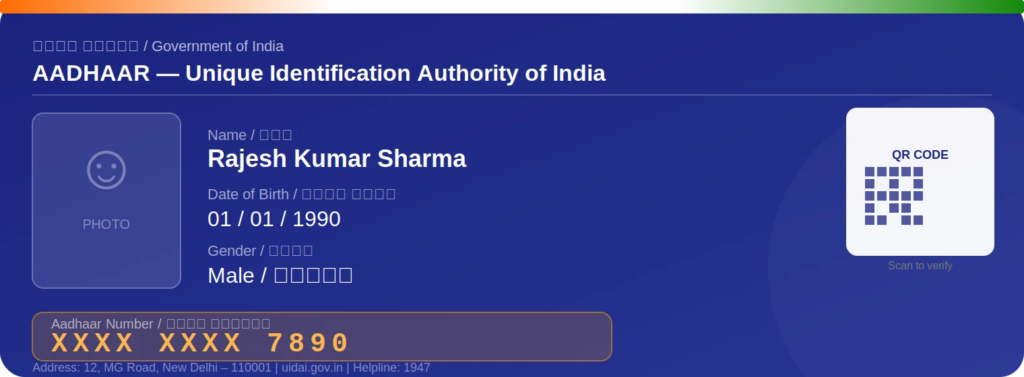
UIDAI stores your biometric data — fingerprints, iris scans, and photograph — inside a highly secure Central Identity Data Repository (CIDR) with 256-bit AES encryption. No third party ever accesses that database directly. When a bank or government office verifies your Aadhaar, UIDAI only returns a yes-or-no confirmation — your real data stays locked at all times.
Types of Aadhaar Card
Most people don’t realize Aadhaar exists in six formats. Every format carries identical legal value — pick one based on how you plan to use it.
Aadhaar Card Apply Online
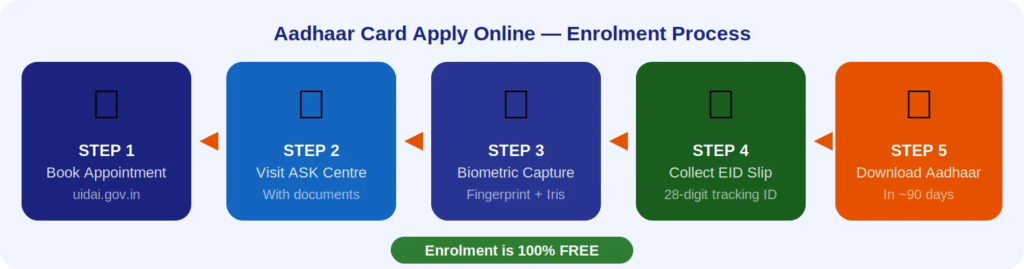
The first step toward getting Aadhaar is understanding what aadhaar card apply online actually means. Enrolment is free, but it is not entirely online — you must visit an Aadhaar Seva Kendra (ASK) once for biometric capture. What you can do online is book your slot in advance using uidai appointment booking on the official portal uidai.gov.in, saving significant wait time at the centre.
Documents You Must Carry
| Category | Accepted Examples |
|---|---|
| Proof of Identity (PoI) | PAN card, Passport, Voter ID, Driving Licence, NREGS Job Card |
| Proof of Address (PoA) | Utility bill (≤3 months), Bank passbook, Ration card, Passport, Driving Licence |
| Proof of Date of Birth | Birth certificate, SSLC marksheet, Passport, PAN card |
| Proof of Relationship | For children — family entitlement document, PDS card, pension card |
Step-by-Step New Enrolment Process
Book your appointment at uidai.gov.in
Go to uidai.gov.in → My Aadhaar → Book an Appointment. Select state, city, and preferred Aadhaar Seva Kendra. Walk-ins are accepted at most centres but wait times are longer.
Visit the centre with original documents
Carry originals — the operator inspects and returns them immediately. Fill Enrolment Form 1 (residents) or Form 2 (NRIs with address outside India).
Biometric capture (5 minutes)
All ten fingerprints, both iris scans, and a live photograph get captured and encrypted on the spot.
Collect your Enrolment ID (EID) slip
Your 28-digit EID slip is your tracking key. Keep it — you need it to check status and do your first download.
Download your Aadhaar once generated
After processing (usually within 90 days), use your EID or Aadhaar number at myaadhaar.uidai.gov.in to complete the download.
Can’t travel to a centre? Use the home enrolment service UIDAI sends an operator to your doorstep for elderly, disabled, or bedridden individuals. Cost: ₹700 for the first person at the address, ₹350 for every additional person at the same address.
Aadhaar Card Download — 5 Official Methods
Once your enrolment is complete, you can do your uidai aadhaar download through five platforms. All of them produce a digitally signed PDF that carries full legal weight across India.
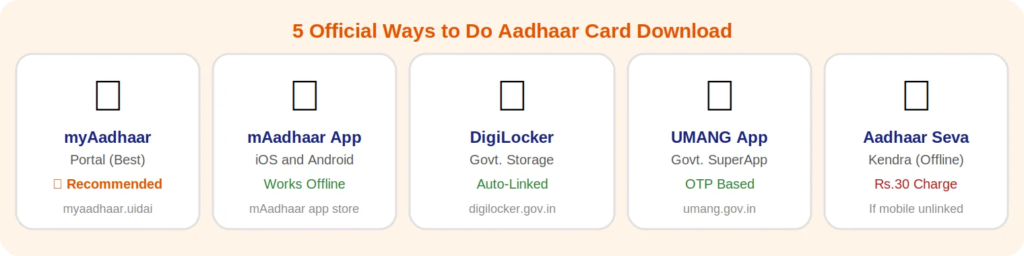
- myAadhaar Portal Visit myaadhaar.uidai.gov.in→ Enter your 12-digit Aadhaar number → Verify with mobile OTP → Choose Regular or masked aadhaar download for privacy → Download as PDF. This is the uidai login route that UIDAI recommends above all others.
- mAadhaar App (Android & iOS) Open mAadhaar → Register your profile with your linked mobile → Tap “Download Aadhaar” → Select regular or masked format → Save the PDF on your phone.
- DigiLocker Sign in at digilocker.gov.in → Issued Documents → Aadhaar Card → Download. Auto-links when your mobile is already registered with UIDAI.
- UMANG App Open UMANG → Search UIDAI → Enter Aadhaar number → OTP → Download e-Aadhaar. A convenient option if you prefer not to install mAadhaar separately.
- Aadhaar Seva Kendra (Offline) If your mobile number is not linked, visit the nearest ASK. Biometric authentication confirms your identity. Cost: ₹30 for a coloured print-out at the counter.
e-Aadhaar PDF password — exact formula
Password = First 4 letters of your name in CAPITALS + year of birth (4 digits). Example: name is Sunita Rao, born 1988 → Password isSUNI1988. Type this exactly into any PDF reader to open your downloaded file.
Aadhaar Card Update
From November 2025, UIDAI expanded aadhaar card update services significantly. You can now fix many details — name, address, date of birth — directly on my aadhaar portal at myaadhaar.uidai.gov.in without visiting any centre. Here is what changed and exactly how to use it.
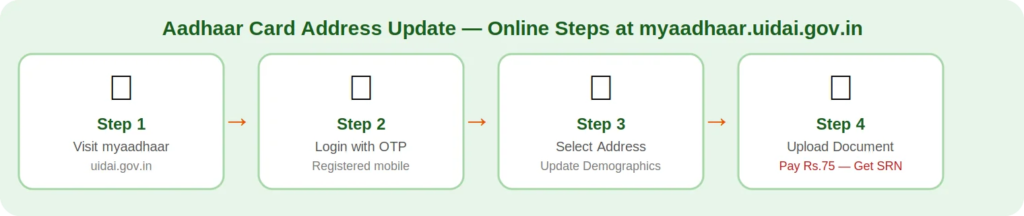
To start any aadhaar update online session, go to myaadhaar.uidai.gov.in → log in with your Aadhaar-linked mobile OTP → click “Update Demographics” → select the field you want to correct → upload your supporting document → pay the applicable fee (see Section 10) → note your SRN for tracking.
Free document upload window — use it before it closes: UIDAI offers free document upload for uidai aadhaar update requests on the myAadhaar portal until 14 June 2026. After that date, a ₹75 charge applies for every document update. If your Aadhaar is older than 10 years or your information has changed, upload fresh documents now.
Aadhaar Card Address Update & Name Correction
These two corrections are among the most commonly requested services on uidai gov in aadhaar, and both now work fully online.
Aadhaar Card Address Update
Moved to a new city or changed your address recently? The aadhaar card address update process is straightforward. Log into myaadhaar.uidai.gov.in → Update Demographics → select Address → upload a valid Proof of Address such as a recent electricity or water bill, bank passbook, or rent agreement → pay ₹75 → receive your SRN via SMS for tracking.
Aadhaar Card Name Correction
Spelling errors in your name cause problems across all linked services — banking, PAN, voter roll. Use the aadhaar card name correction feature to fix this. Upload a valid Proof of Identity showing the correct spelling — Passport, Voter ID, or PAN card all work. UIDAI’s system auto-verifies the document against official databases and processes the correction within 30 days in most cases.
NOTE: After every online request — whether it’s a name correction or address change — UIDAI sends an SRN (Service Request Number) to your registered mobile. Use it at myaadhaar.uidai.gov.in → “Check Update Status” to monitor progress. Status stages: Submitted → Under Review → Completed or Rejected.
Aadhaar Card Mobile Number Update
Your linked mobile number is the master key to every Aadhaar online service. Without it, you cannot receive an OTP to download aadhaar card, update, or verify your Aadhaar. If you recently changed your number or never linked one — here is exactly what to do.
Aadhaar Card Mobile Number Update
The aadhaar card mobile number update still requires a physical visit to an Aadhaar Seva Kendra — it cannot be done online as of May 2025. Follow these steps:
- Book your appointment at uidai.gov.in: Select “Mobile/Email Update” as your service type and choose a centre nearby.
- Visit the Aadhaar Seva Kendra: Carry your Aadhaar number and the new number you want to link. No additional identity document is needed for this update.
- Biometric verification at the counter: The operator confirms your identity with fingerprint or iris scan. Your new number becomes active within 24 to 48 hours.
Aadhaar Mobile Number Link
Never linked a mobile number before? The aadhaar mobile number link process works the same way — visit an ASK, complete biometric verification, and provide the number you want to register. There is no charge for the first-time mobile linkage.
Aadhaar Mobile Number Check
For a quick aadhaar mobile number check, go to myaadhaar.uidai.gov.in → click “Verify Email/Mobile Number” → enter the number you think is registered. The portal confirms or denies in seconds — no OTP required for this verification step.
You can also link mobile number with aadhaar for family members at the same centre visit, which saves multiple trips. Each person still needs to authenticate biometrically.
Aadhaar Biometric Update & Document Update
Aadhaar Biometric Update
Fingerprints change with age, illness, or heavy manual work. Eyes change too. When your biometric data no longer matches your stored record, authentication fails across all services. The aadhaar biometric update fixes this — and it is mandatory for children at age 5 (Mandatory Biometric Update) and again at age 15.
Biometric updates always require an in-person visit to an Aadhaar Seva Kendra. Book an appointment online first, then attend for fingerprint, iris, and photo recapture. Cost: ₹125 for adults (free for children aged 5–15 until September 2026).
Children’s biometric deadline — don’t miss it
Children who got Baal Aadhaar under age 5 must update biometrics between ages 5–7
Missing this update leads to Aadhaar deactivation — blocking scholarships, exams, and DBT payments
UIDAI is currently running free biometric update camps at schools across India
Free window for children aged 5–17: valid until 30 September 2026
Aadhaar Document Update
An aadhaar document update means uploading fresh, current supporting documents to your Aadhaar record — especially important if your Aadhaar was issued more than 10 years ago or if your name, address, or date of birth has changed since enrolment. This update is free on the myAadhaar portal until 14 June 2026. After that date, the charge is ₹75 per request.
Accepted documents for this update include PAN card, Passport, Voter ID, Driving Licence, utility bills, and bank passbooks — the same documents used during original enrolment.
PAN–Aadhaar Link, Bank Account & Ration Card
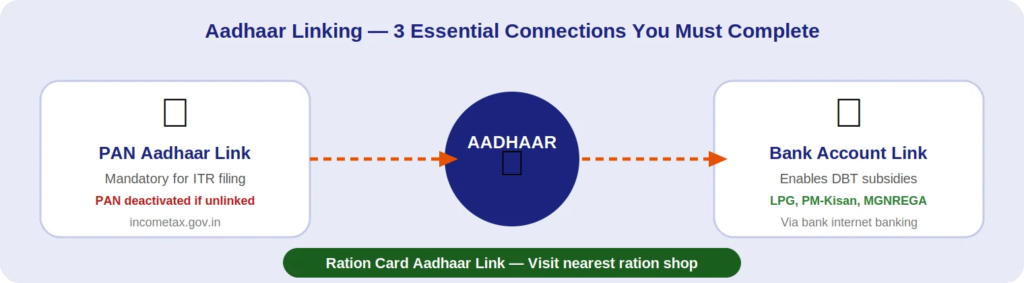
PAN Aadhaar Link
The Central Board of Direct Taxes (CBDT) made the pan aadhaar link compulsory for all PAN card holders in India. If you have not linked yet, your PAN faces deactivation — which means you cannot open a bank account, invest in the stock market or mutual funds, or file an income tax return (ITR).
How to link: Go to incometax.gov.in → Quick Links → Link Aadhaar → enter your PAN and Aadhaar number → pay the ₹1,000 penalty if linking is delayed → verify with OTP → done. After submitting, check your aadhaar pan link status on the same page by entering both numbers. The portal shows “Linked,” “Pending,” or “Not Linked” within seconds.
Bank Account Aadhaar Link
Completing the bank account aadhaar link unlocks Direct Benefit Transfer (DBT) — the system that sends LPG cash subsidies, PM-Kisan instalments, MGNREGA wages, pension payments, and scholarship money straight into your bank account with zero middlemen and zero leakage.
How to link: Log into your bank’s internet banking → Profile or KYC section → enter Aadhaar number → verify with OTP → done in under 10 minutes. You can also walk into any branch with your Aadhaar card and the teller completes it at the counter.
Ration Card Aadhaar Link
The ration card aadhaar link is mandatory under the National Food Security Act. Households that have not completed this linking face suspension of subsidised grain and food entitlements. Your family cannot access PDS benefits without it.
How to link: Visit your state’s official Food and Civil Supplies website online, or go to your nearest ration shop with your Aadhaar card and ration card. Many states also offer linking through their official PDS mobile apps. The process takes under 10 minutes at the shop.
Aadhaar Card Status Check, Verification & Reprint
Aadhaar Card Status Check
Use your reference number to track any Aadhaar request. The aadhaar card status check process uses three different numbers depending on what you submitted:
| Reference Number | When You Get It | How to Check Status |
|---|---|---|
| EID — Enrolment ID | After new enrolment at any ASK | uidai.gov.in → Check Aadhaar Status → Enter EID + date and time of enrolment |
| URN — Update Request No. | After submitting an online update | myaadhaar.uidai.gov.in → Check Update Status → Enter URN |
| SRN — Service Request No. | After any service request — sent via SMS | Same myAadhaar portal; also checkable via UIDAI helpline 1947 |
Aadhaar Card Verification
Banks, schools, employers, and government offices use aadhaar card verification to confirm that a number is genuine and active. Anyone can verify at uidai.gov.in → Verify Aadhaar Number → enter the 12-digit number + captcha → click Verify. UIDAI responds instantly with a valid or invalid status — without revealing any personal data about the holder.
Aadhaar Card Reprint
If your original Aadhaar letter is torn, lost, or too old to read, you can order an aadhaar card reprint directly from the UIDAI portal. Go to uidai.gov.in → My Aadhaar → Order Aadhaar Reprint → enter your Aadhaar number → verify with OTP → pay ₹40 → UIDAI mails a fresh copy to your registered address via Speed Post. Alternatively, order the PVC plastic card for ₹50 — it is more durable and wallet-friendly.
Use Aadhaar Mitra for instant answers — 24×7
UIDAI’s official AI chatbot, Aadhaar Mitra, is available at uidai.gov.in in both Hindi and English around the clock. It handles update status queries, PVC card tracking, nearest centre locations, and document requirement questions — without any queue wait. Look for the chat icon on the UIDAI homepage.
Aadhaar Privacy, Security & Smart Usage Rules
UIDAI’s own guidance puts it plainly: use Aadhaar exactly the way you use your debit card. You hand it over when a trusted institution asks, but you never post it on social media. Follow this framework and your data stays safe.
✅ Always Do This
- Use Aadhaar freely for identity verification at banks, hospitals, and government offices
- Choose masked Aadhaar when sharing with private companies for KYC
- Generate a 16-digit Virtual ID (VID) to protect your real Aadhaar number during authentication
- Lock your biometrics via mAadhaar whenever you are not actively using them
- Write “For [purpose] use only — [date]” on any photocopy you hand over
- Check your Aadhaar authentication history on
myAadhaar regularly
❌ Never Do This
- Never post your Aadhaar number or photo on WhatsApp,
Facebook, or any public platform - Don’t hand out a blank photocopy without a purpose stamp
- Never share your mobile OTP with anyone — UIDAI never calls to
ask for it - Don’t use unofficial third-party websites claiming to offer Aadhaar services
- Never apply for a second Aadhaar — one person gets exactly one
, and duplicates get deactivated - Never access Aadhaar services on public or shared computers
Aadhaar Service Fee Structure
Know the charges upfront so there are no surprises at the centre or payment page:
| Service | Old Fee | New Fee (Oct 2025) | Notes |
|---|---|---|---|
| Demographic update (name/address/DOB/mobile/email) | ₹50 | ₹75 Revised | |
| Biometric update — adults (fingerprint/iris/photo) | ₹100 | ₹125 Revised | |
| Children aged 5–7 years — biometric update | ₹100 | FREE Till Sep 2026 | Mandatory Biometric Update |
| Children aged 7–15 years — biometric update | ₹100 | FREE Till Sep 2026 | |
| Document upload at myAadhaar portal (online) | ₹50 | FREE Till 14 Jun 2026 | After deadline: ₹75 |
| Aadhaar card reprint (letter) | ₹50 | ₹40 | |
| Aadhaar PVC plastic card order | ₹50 | ₹50 | No change |
| Home enrolment (first person) | — | ₹700 | +₹350 each additional |
2028 fee increase already planned — act now to save
From 2028, demographic updates will cost ₹90 and biometric updates ₹150. Fix outdated details now while fees are lower, and use the free online document upload window before it closes on 14 June 2026.
Frequently Asked Questions
What is the correct process for aadhaar card correction online?
Go to myaadhaar.uidai.gov.in → log in with your mobile OTP → click “Update Demographics” → select the detail you want to fix (name, address, or date of birth) → upload your supporting document → pay ₹75 → save the SRN that UIDAI sends via SMS. Track progress using the SRN under “Check Update Status.” Most aadhaar card correction online requests complete within 30 days.
How do I do an aadhaar card apply online if I have never enrolled?
New enrolment always requires a physical visit for biometric capture — fully online enrolment is not available. What you can do online is use uidai appointment booking at uidai.gov.in to reserve your slot before visiting. This avoids long walk-in queues and makes the centre visit much faster. Enrolment itself is completely free of charge.
Is e-Aadhaar downloaded from the portal legally valid?
Yes — completely. A digitally signed e-Aadhaar PDF carries the same legal standing as your original letter or PVC card. Banks, airlines, government departments, hospitals, and schools all accept it. The UIDAI digital signature embedded in the PDF makes it tamper-proof and instantly verifiable.
How do I check my aadhaar pan link status after submitting the request?
Go to incometax.gov.in → Quick Links → Link Aadhaar Status → enter your PAN and Aadhaar number → click Submit. The portal displays the current aadhaar pan link status instantly — either “Linked,” “Pending,” or “Not Linked.” If not linked, your PAN risks deactivation and ITR filing gets blocked.
My child is 6 years old and we missed the aadhaar biometric update. What happens now?
Missing the Mandatory Biometric Update at ages 5 and 15 can lead to Aadhaar deactivation for your child. A deactivated Aadhaar blocks access to scholarships, competitive exams, and government benefits like mid-day meals. Act quickly — aadhaar biometric update for children aged 5–15 is free until September 2026. Visit any Aadhaar Seva Kendra — no appointment needed for children’s biometric camps.
How do I complete aadhaar card verification for myself or someone else?
Go to uidai.gov.in → Verify Aadhaar Number → enter the 12-digit number and complete the captcha → click Verify. UIDAI instantly confirms whether the number is active or deactivated — without showing any personal data. For offline aadhaar card verification, scan the QR code on the physical or digital card using the mAadhaar app — this works without internet.
What is the aadhaar card mobile number check process and can I do it online?
Yes — fully online. Visit myaadhaar.uidai.gov.in → “Verify Email/Mobile Number” → type the number you believe is registered. The portal confirms whether it is linked to your Aadhaar or not — instantly and free of charge. If the number is wrong or missing, you need to visit an Aadhaar Seva Kendra to complete the aadhaar mobile number link update in person.
For every service — aadhaar card download, uidai aadhaar update, reprint, or linking — use uidai.gov.in
or
myaadhaar.uidai.gov.in
only. Fraudulent sites mimic the UIDAI interface and steal your data. If anything looks uncertain, call the UIDAI toll-free helpline:
1947
(available 24 hours, 7 days a week).
Your Aadhaar Readiness Checklist
Run through this list before you close the tab. Each item protects your access to government services, banking, and benefits.
- Mobile number is linked and active on Aadhaar — verify via myAadhaar portal
- PAN Aadhaar link is complete — check status at incometax.gov.in
- Name and address match your latest supporting documents — use aadhaar card address update or name correction if needed
- Children’s aadhaar biometric update done at age 5 and 15
- Bank account Aadhaar link complete — enables direct subsidy transfers
- Ration card Aadhaar link updated at your nearest ration shop
- e-Aadhaar downloaded and stored safely in DigiLocker or your phone
Aadhaar is not just a card — it is the digital foundation that connects you to India’s government services, financial system, and identity infrastructure. The only way it keeps working for you is if you keep it accurate, secure, and updated. Use official channels every single time, protect it from misuse, and check your authentication history regularly on the my Aadhaar portal.